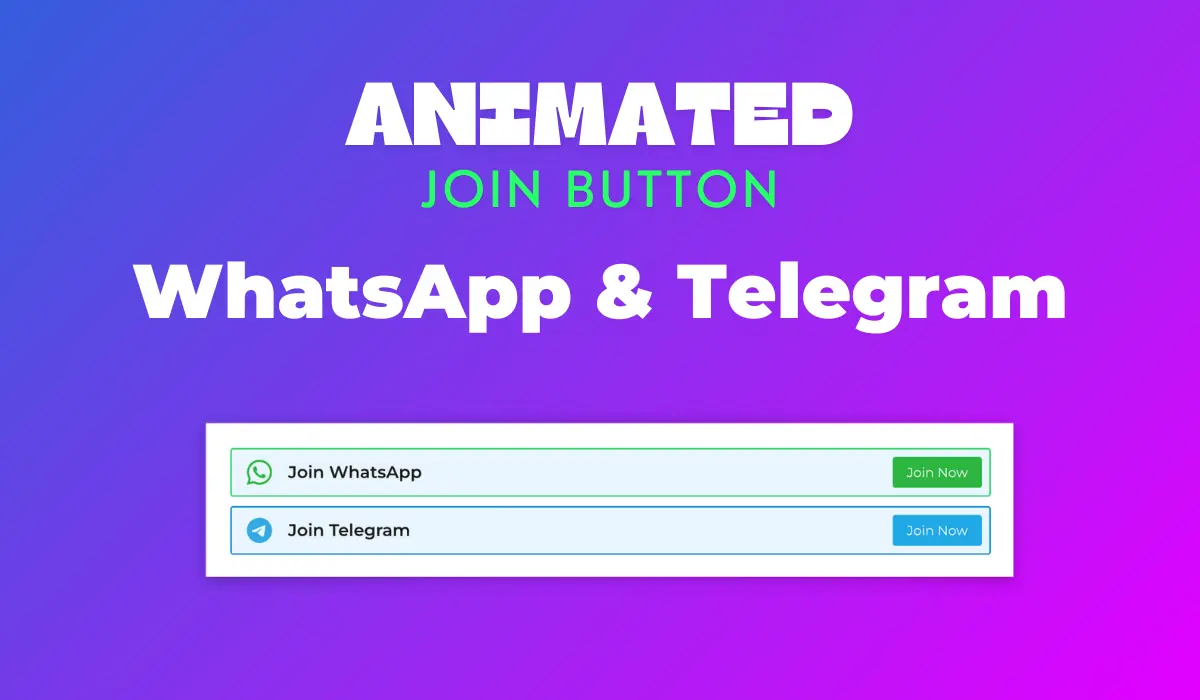
GeneratePress Mein Animated WhatsApp & Telegram Join Buttons Kaise Lagayein?
Kya aap apne website visitors se direct connect karna chahte hain? Aajkal har koi WhatsApp aur Telegram par active hai, toh kaisa rahega agar aap unhe seedha apne group mein join karne ka option de dein, woh bhi ek cool animated button ke saath? Agar aap GeneratePress theme use karte hain, toh yeh karna bahut easy hai aur aapki site ki engagement bhi badha dega.
Key Points
- Apni website par animated WhatsApp aur Telegram join buttons add karein.
- GeneratePress theme aur GP Premium plugin ka use hoga.
- GenerateBlocks plugin se design aur structure banega.
- Custom CSS se buttons mein smooth animation add hogi.
- Step-by-step guide se process ko follow karna easy hai.
Kyun Zaroori Hain Yeh Animated Buttons?
Aaj ke digital daur mein, sirf content publish karna kaafi nahi hai. Aapko apne audience ke saath ek strong connection banana padta hai. Aur iske liye, WhatsApp aur Telegram groups se behtar aur kya ho sakta hai? India mein toh yeh platforms communication ke liye lifeline ban chuke hain. Jab aap apni website par in groups ko join karne ka option dete hain, toh aap direct engagement ka ek naya rasta khol dete hain.
Socho, agar aapke buttons static aur boring hon, toh shayad koi unhe notice bhi na kare. Lekin, agar woh animated hon, blink kar rahe hon ya thoda highlight ho rahe hon, toh user ka attention automatically unki taraf jayega. Yeh choti si detail aapki website ki user experience ko kaafi enhance kar sakti hai aur aapke group join rates ko bhi boost kar sakti hai. Basically, yeh ek smart tareeka hai apne visitors ko community ka hissa banane ka.
Kya-Kya Chahiye Hoga Setup Ke Liye?
Is awesome feature ko apni GeneratePress website par add karne ke liye, aapko kuch basic tools ki zaroorat padegi. Don’t worry, sab kuch easily available hai aur zyada technical knowledge ki bhi zaroorat nahi padegi. Bas kuch plugins aur GeneratePress ke built-in features ka use karna hoga.
Sabse pehle, aapke paas GeneratePress Theme install hona chahiye (iska free version bhi chalega). Phir, aapko GP Premium Plugin ki zaroorat padegi, kyunki ismein hi woh powerful ‘Elements’ module hota hai jiska hum use karenge. Aur finally, humara hero, GenerateBlocks Plugin (iska free version kaafi hai) jo humein buttons design karne mein help karega. Yeh teeno milkar aapke kaam ko bahut aasan bana denge.
Pro Tip: Hamesha apne plugins aur theme ko latest version par update rakhein, taaki koi compatibility issue na aaye aur aapko latest features milte rahein.
Step-by-Step Guide: Buttons Kaise Add Karein?
Chalo ab seedha kaam ki baat karte hain. Yeh poora process humne kuch easy steps mein divide kiya hai, taaki aap bina kisi confusion ke apne animated buttons add kar sakein. Bas dhyan se har step ko follow karna.
Plugins Install Aur Activate Karein
- Sabse pehle, apne WordPress dashboard mein login karein. Agar aapke paas GeneratePress Theme install nahi hai, toh `Appearance > Themes > Add New` par jaakar install aur activate karein.
- Next, GP Premium Plugin ko install aur activate karein. Yeh ek paid plugin hai, toh ensure karein ki aapke paas iska license hai.
- Finally, GenerateBlocks Plugin ko install aur activate karein. Yeh aapko `Plugins > Add New` mein mil jayega. Iska free version hamare purpose ke liye perfect hai.
GeneratePress Elements Setup
GP Premium ka ‘Elements’ module bahut powerful hai. Isko activate karna bahut zaroori hai:
- `Appearance > GeneratePress` par jaao.
- Yahan aapko Elements Module dikhega. Ise activate kar do.
- Ek baar activate hone ke baad, apni website ko ek baar refresh zaroor kar lena.
Block Element Banayein Aur Code Paste Karein
Ab hum buttons ko design karenge GenerateBlocks ki madad se:
- `Appearance > GeneratePress > Elements` par jaao.
- `Add New Element` par click karo aur Element Type mein `Block` select karo.
- Is Block Element ko ek title do, jaise “Animated WhatsApp Telegram Buttons”.
<!-- wp:generateblocks/container {"uniqueId":"019d081e","isDynamic":true,"blockVersion":4,"spacing":{"marginTop":"","marginLeft":"","marginRight":"","marginBottom":"","marginLeftTablet":"20px","marginRightTablet":"20px"}} -->
<!-- wp:generateblocks/container {"uniqueId":"4ae1aeb3","isDynamic":true,"blockVersion":4,"useGlobalMaxWidth":true,"spacing":{"marginRight":"auto","marginLeft":"auto"}} -->
<!-- wp:generateblocks/container {"uniqueId":"f3bf61db","backgroundColor":"#eaf6ff","isDynamic":true,"blockVersion":4,"display":"flex","flexDirection":"row","alignItems":"center","justifyContent":"space-between","spacing":{"paddingTop":"8px","paddingLeft":"8px","paddingRight":"8px","paddingBottom":"8px","marginTop":"10px","marginBottom":"10px"},"borders":{"borderTopWidth":"1.5px","borderRightWidth":"1.5px","borderBottomWidth":"1.5px","borderLeftWidth":"1.5px","borderTopStyle":"solid","borderRightStyle":"solid","borderBottomStyle":"solid","borderLeftStyle":"solid","borderTopColor":"","borderRightColor":"","borderBottomColor":"","borderLeftColor":"","borderTopColorHover":"","borderRightColorHover":"","borderBottomColorHover":"","borderLeftColorHover":"","borderTopLeftRadius":"3px","borderTopRightRadius":"3px","borderBottomLeftRadius":"3px","borderBottomRightRadius":"3px"},"className":"whatsapphighlight"} -->
<!-- wp:generateblocks/headline {"uniqueId":"1a04e78c","blockVersion":3,"display":"flex","alignItems":"center","columnGap":"0.5em","typography":{"fontSize":"18px","fontSizeMobile":"13px"},"spacing":{"marginBottom":"0px"},"hasIcon":true,"iconColor":"#2cb641","iconStyles":{"height":"1.5em","width":"1.5em","paddingRight":"8px","paddingLeft":"8px"}} -->
<h2 class="gb-headline gb-headline-1a04e78c"><span class="gb-icon"><svg viewBox="0 0 16 16" class="bi bi-whatsapp" fill="currentColor" height="16" width="16" xmlns="http://www.w3.org/2000/svg">   <path d="M13.601 2.326A7.854 7.854 0 0 0 7.994 0C3.627 0 .068 3.558.064 7.926c0 1.399.366 2.76 1.057 3.965L0 16l4.204-1.102a7.933 7.933 0 0 0 3.79.965h.004c4.368 0 7.926-3.558 7.93-7.93A7.898 7.898 0 0 0 13.6 2.326zM7.994 14.521a6.573 6.573 0 0 1-3.356-.92l-.24-.144-2.494.654.666-2.433-.156-.251a6.56 6.56 0 0 1-1.007-3.505c0-3.626 2.957-6.584 6.591-6.584a6.56 6.56 0 0 1 4.66 1.931 6.557 6.557 0 0 1 1.928 4.66c-.004 3.639-2.961 6.592-6.592 6.592zm3.615-4.934c-.197-.099-1.17-.578-1.353-.646-.182-.065-.315-.099-.445.099-.133.197-.513.646-.627.775-.114.133-.232.148-.43.05-.197-.1-.836-.308-1.592-.985-.59-.525-.985-1.175-1.103-1.372-.114-.198-.011-.304.088-.403.087-.088.197-.232.296-.346.1-.114.133-.198.198-.33.065-.134.034-.248-.015-.347-.05-.099-.445-1.076-.612-1.47-.16-.389-.323-.335-.445-.34-.114-.007-.247-.007-.38-.007a.729.729 0 0 0-.529.247c-.182.198-.691.677-.691 1.654 0 .977.71 1.916.81 2.049.098.133 1.394 2.132 3.383 2.992.47.205.84.326 1.129.418.475.152.904.129 1.246.08.38-.058 1.171-.48 1.338-.943.164-.464.164-.86.114-.943-.049-.084-.182-.133-.38-.232z"></path> </svg></span><span class="gb-headline-text">Join WhatsApp</span></h2>
<!-- /wp:generateblocks/headline -->

<!-- wp:generateblocks/button {"uniqueId":"e815a396","blockVersion":4,"display":"inline-flex","typography":{"fontSize":"14px"},"spacing":{"paddingTop":"6px","paddingRight":"15px","paddingBottom":"6px","paddingLeft":"15px"},"borders":{"borderTopLeftRadius":"3px","borderTopRightRadius":"3px","borderBottomLeftRadius":"3px","borderBottomRightRadius":"3px"},"backgroundColor":"#2cb641","backgroundColorHover":"#1e9b31","textColor":"#ffffff","textColorHover":"#ffffff"} -->
<span class="gb-button gb-button-e815a396 gb-button-text">Join Now</span>
<!-- /wp:generateblocks/button -->
<!-- /wp:generateblocks/container -->

<!-- wp:generateblocks/container {"uniqueId":"9e5635a7","backgroundColor":"#eaf6ff","isDynamic":true,"blockVersion":4,"display":"flex","flexDirection":"row","alignItems":"center","justifyContent":"space-between","spacing":{"paddingTop":"8px","paddingLeft":"8px","paddingRight":"8px","paddingBottom":"8px","marginTop":"10px","marginBottom":"10px"},"borders":{"borderTopWidth":"1.5px","borderRightWidth":"1.5px","borderBottomWidth":"1.5px","borderLeftWidth":"1.5px","borderTopStyle":"solid","borderRightStyle":"solid","borderBottomStyle":"solid","borderLeftStyle":"solid","borderTopColor":"","borderRightColor":"","borderBottomColor":"","borderLeftColor":"","borderTopColorHover":"","borderRightColorHover":"","borderBottomColorHover":"","borderLeftColorHover":"","borderTopLeftRadius":"3px","borderTopRightRadius":"3px","borderBottomLeftRadius":"3px","borderBottomRightRadius":"3px"},"className":"telegramhighlight"} -->
<!-- wp:generateblocks/headline {"uniqueId":"a5d4a0c6","blockVersion":3,"display":"flex","alignItems":"center","columnGap":"0.5em","typography":{"fontSize":"18px","fontSizeMobile":"13px"},"spacing":{"marginBottom":"0px"},"hasIcon":true,"iconColor":"#34aae2","iconStyles":{"height":"1.5em","width":"1.5em","paddingRight":"8px","paddingLeft":"8px"}} -->
<h2 class="gb-headline gb-headline-a5d4a0c6"><span class="gb-icon"><svg viewBox="0 0 16 16" class="bi bi-telegram" fill="currentColor" height="16" width="16" xmlns="http://www.w3.org/2000/svg">   <path d="M16 8A8 8 0 1 1 0 8a8 8 0 0 1 16 0M8.287 5.906c-.778.324-2.334.994-4.666 2.01-.378.15-.577.298-.595.442-.03.243.275.339.69.47l.175.055c.408.133.958.288 1.243.294.26.006.549-.1.868-.32 2.179-1.471 3.304-2.214 3.374-2.23.05-.012.12-.026.166.016.047.041.042.12.037.141-.03.129-1.227 1.241-1.846 1.817-.193.18-.33.307-.358.336a8.154 8.154 0 0 1-.188.186c-.38.366-.664.64.015 1.088.327.216.589.393.85.571.284.194.568.387.936.629.093.06.183.125.27.187.331.236.63.448.997.414.214-.02.435-.22.547-.82.265-1.417.786-4.486.906-5.751a1.426 1.426 0 0 0-.013-.315.337.337 0 0 0-.114-.217.526.526 0 0 0-.31-.093c-.3.005-.763.166-2.984 1.09z"></path> </svg></span><span class="gb-headline-text">Join Telegram</span></h2>
<!-- /wp:generateblocks/headline -->

<!-- wp:generateblocks/button {"uniqueId":"c8bfe827","blockVersion":4,"display":"inline-flex","typography":{"fontSize":"14px"},"spacing":{"paddingTop":"6px","paddingRight":"15px","paddingBottom":"6px","paddingLeft":"15px"},"borders":{"borderTopLeftRadius":"3px","borderTopRightRadius":"3px","borderBottomLeftRadius":"3px","borderBottomRightRadius":"3px"},"backgroundColor":"#20a8e7","backgroundColorHover":"#1790c8","textColor":"#ffffff","textColorHover":"#ffffff"} -->
<span class="gb-button gb-button-c8bfe827 gb-button-text">Join Now</span>
<!-- /wp:generateblocks/button -->
<!-- /wp:generateblocks/container -->
<!-- /wp:generateblocks/container -->
<!-- /wp:generateblocks/container -->- Ab jo block editor open hoga, usmein aapko source content mein diya gaya GenerateBlocks code paste karna hai. Yeh code WhatsApp aur Telegram buttons ka structure aur initial styling set karega. Aapko bas `Code Editor` mode mein jaakar paste karna hai aur phir `Visual Editor` mein wapas aakar apne group links update karne hain.
Display Rules Aur Hook Set Karein
Buttons kahan dikhenge, yeh set karna bahut important hai:
- Block Element ke sidebar mein Display Rules tab par jaao.
- Location ko `Entire Site` choose karo, agar aap har page par buttons dikhana chahte ho. Ya phir specific posts/pages bhi select kar sakte ho.
- Ab Element tab par jaao. Yahan Element Type ko `Hook` select karo aur Hook Name ko `before_header` choose karo. Isse buttons aapki website ke header se pehle dikhenge. Agar aap post ke neeche dikhana chahte hain, toh `after_content` ya `generate_after_content` hook use kar sakte hain.
Animation Ke Liye CSS Add Karein
Buttons ko animated banane ke liye, hum thoda sa custom CSS add karenge:
- `Appearance > Customize > Additional CSS` par jaao.
- Neeche diya gaya CSS code paste kar do. Yeh code buttons ko highlight karne ke liye ek subtle border animation add karega.
.whatsapphighlight {
    animation: WPLiteTheme-GreenBorderAnimation 1s infinite;
}
.telegramhighlight {
    animation: WPLiteTheme-BlueBorderAnimation 1s infinite;
}

@keyframes WPLiteTheme-GreenBorderAnimation {
    0% { border-color: #2cb641; }
    50% { border-color: #a0e6aa; }
    100% { border-color: #2cb641; }
}

@keyframes WPLiteTheme-BlueBorderAnimation {
    0% { border-color: #20a8e7; }
    50% { border-color: #a0dff7; }
    100% { border-color: #20a8e7; }
}
Important Tips Aur Customization
Ek baar buttons add ho gaye, toh aap unhe apni marzi se customize bhi kar sakte ho. GenerateBlocks ka editor bahut flexible hai. Aap buttons ka text, colors, font size, aur padding easily change kar sakte ho. Bas Block Element ko edit karo aur GenerateBlocks ke options explore karo. WhatsApp aur Telegram group links ko update karna mat bhoolna – yeh sabse zaroori hai!
Agar aap buttons ki position change karna chahte ho, toh Element tab mein Hook Name ko adjust kar sakte ho. Jaise, `after_footer` ya `wp_footer` par buttons website ke bottom mein dikhenge. Animation ki speed ya style change karne ke liye, `Additional CSS` mein `@keyframes` values ko tweak kar sakte ho. Thoda experimentation se aapko perfect look mil jayega.
Conclusion / Nishkarsh
Toh dekha aapne, GeneratePress aur GenerateBlocks ki madad se animated WhatsApp aur Telegram group join buttons add karna kitna aasan hai. Yeh chota sa feature aapki website ki engagement ko next level par le ja sakta hai, users ko direct communication ka rasta dekar.
Is guide ko follow karke, aap apni website ko aur bhi interactive aur user-friendly bana sakte hain. Toh der kis baat ki? Abhi try karo aur apne visitors ko apni community ka hissa banao. Happy building!
Aksar Puche Jane Wale Questions
”
Disclaimer: Yeh article informational purpose ke liye original words mein likha gaya hai. Kisi bhi important decision se pehle official source se zaroor verify karein.